Finding jobs
Job Seeker Copilot brings vacancies from several job sites into one search, removes clearly unsuitable results, and orders the remaining jobs using your chosen role and profile. You stay in control: always check the full advert on its original site before applying.
Before your first search
Your profile needs enough information to know what to look for. Add:
- at least one target role;
- whether you want on-site, hybrid or remote work; and
- a searchable location and commuting distance when location matters.
Skills, previous jobs and other confirmed experience are not required simply to browse. Adding them can, however, make the match explanation more useful. See Getting started for help completing your profile.
1. Choose a target role
Open Search. Your first target role is searched automatically. If another role says Not searched, select it to run that search.
The number beside a searched role is the total number of eligible, deduplicated matches for that role. It is not just the number currently visible. Choosing a different target role also resets any source filter, so you can review that result set from the beginning.
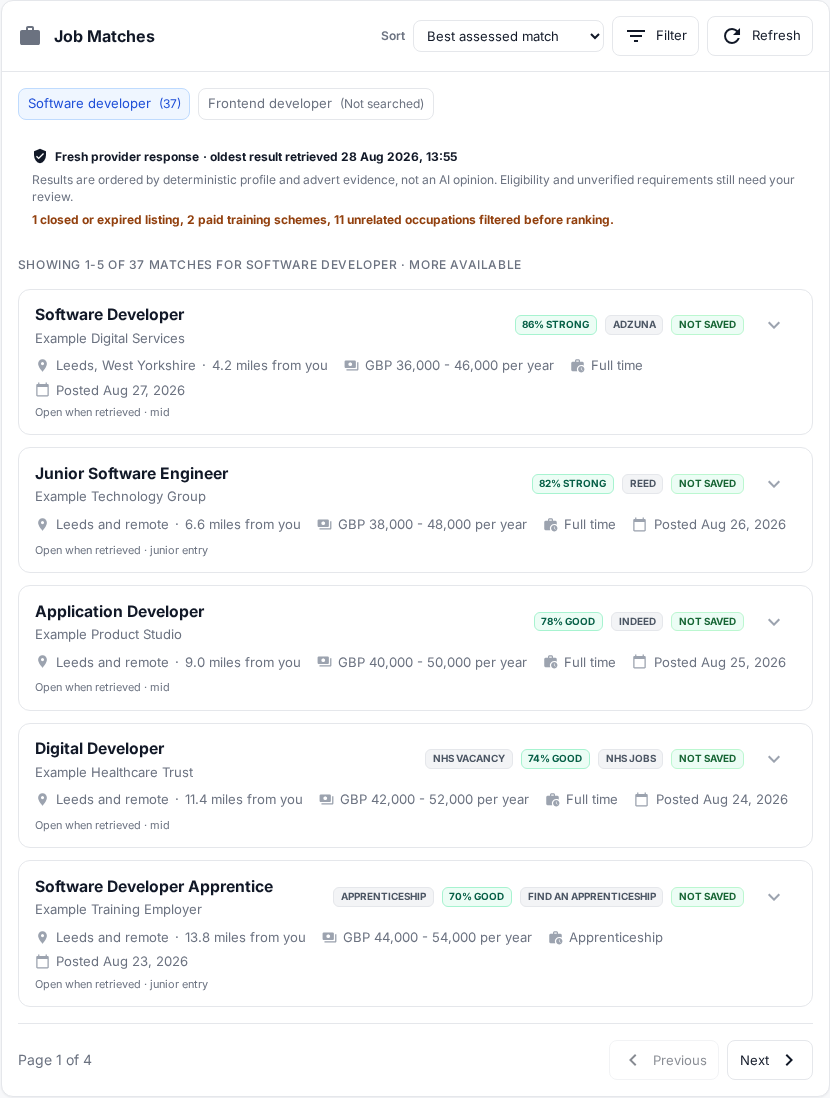
The role count covers the complete result set. The page shows only one portion at a time. All names and vacancies in this image are fictional demonstration data.
2. Understand where jobs come from
Search can include vacancies from:
| Source shown in the application | What to expect |
|---|---|
| Reed.co.uk | General vacancies published through Reed. |
| Adzuna | General vacancies supplied by Adzuna. |
| Indeed, LinkedIn, an employer site or Other | Vacancies from a broader search integration are labelled by their original publisher when that can be identified. |
| NHS Jobs | Official NHS Jobs vacancies. |
| Find an apprenticeship | Official apprenticeship vacancies. |
A source appears in Filter only when at least one vacancy from it is present on the current page. Its absence does not by itself mean that the source is broken; it can simply mean that it returned no eligible vacancy for this page and search.
Some vacancies are advertised in more than one place. Job Seeker Copilot combines recognised duplicates, but one vacancy may retain more than one source. For that reason, source counts can overlap.
3. Sort and filter the results
Use Sort to change the order of the current search. Available choices include:
- Best assessed match — the default, based on the available profile and advert evidence;
- Closest — useful when your profile has a precise searchable location;
- Highest salary — uses salary information supplied with the adverts;
- Newest or Oldest — uses the supplied posting date;
- Company A–Z; and
- Job title A–Z.
Use Filter to show jobs from one source. The source controls state that their counts show jobs on this page. They are not the total number found across every page. Select All Job Sites to restore the combined view.
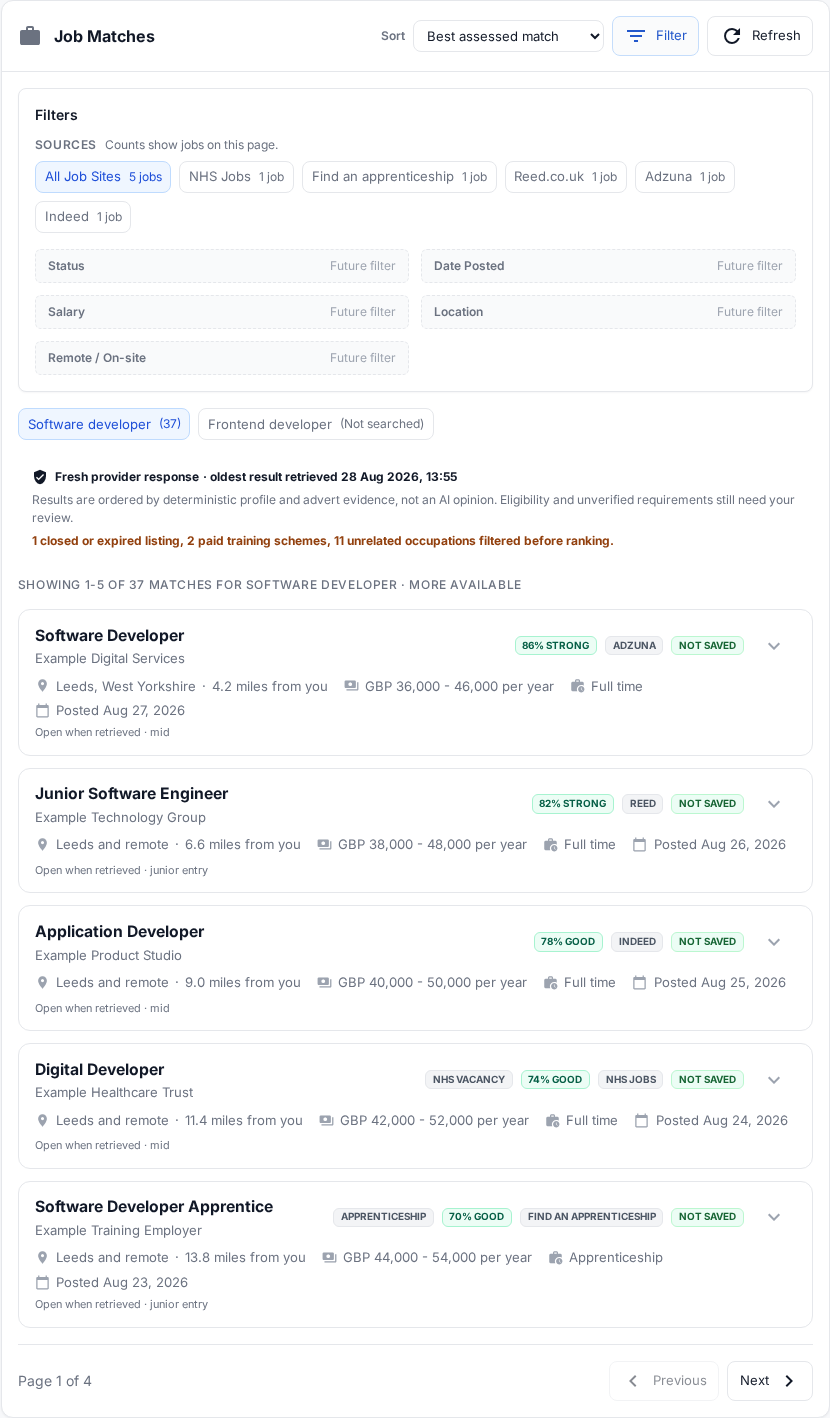
In this fictional example, five jobs are on the page and each comes from a different source. Filters marked Future filter are visible previews and cannot yet be selected.
Use Next and Previous below the vacancies to move through a multi-page result set.
4. Read a job card
Each collapsed card can show:
- job title and employer;
- location and an estimated straight-line distance from your profile location;
- salary, working pattern or employment type when the source supplied them;
- posting date and availability at the time it was retrieved;
- source or specialist labels, such as NHS vacancy or Apprenticeship;
- a match label; and
- whether the vacancy is saved to your applications.
Missing information is not guessed. A blank salary or working pattern usually means that the source did not provide a usable value, so check the full advert.
Select the arrow on a card to expand it.
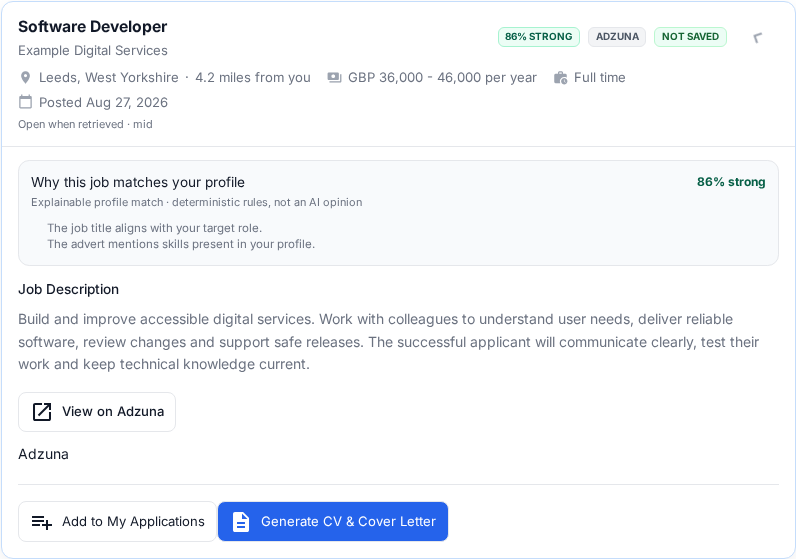
Expand a vacancy to review the available description, why it matched and the link to its original advert.
What the match label means
The match assessment uses deterministic rules and the information available from your profile and the advert. It is not an AI opinion, an employer decision, a prediction of success or a guarantee that you are eligible.
Expand Why this job matches your profile to see the available reasons. A strong title match does not override an essential qualification, right-to-work condition, licence, location requirement or other eligibility rule. Check those yourself before applying.
If your profile has little confirmed career information, the assessment may rely mainly on your target role and advert title. Add accurate skills and confirmed experience if you want richer evidence.
5. Check the original advert
Select View on Reed, View on Adzuna, Open full official NHS advert or the equivalent source button. The original provider or employer page is authoritative for:
- the complete responsibilities and person specification;
- closing date and whether the vacancy is still open;
- salary, hours, location and working arrangements;
- eligibility and sponsorship;
- the employer's application questions; and
- how the application must be submitted.
An advert can change or close after Job Seeker Copilot retrieved it. Open when retrieved means it appeared available at retrieval time, not that the employer guarantees it is still open now.
Fresh and cached results
The note above the results says whether the response came freshly from providers or from a bounded cache, and shows the age of the oldest result in that response. Refresh reruns your search, although recently retrieved provider data may still be reused for a limited period. A fresh response also does not mean every vacancy was posted today; use each card's posting date.
Apprenticeships and training results
Official Find an apprenticeship vacancies can appear alongside other jobs and carry an Apprenticeship label. Review the wage, level, duration, training provider, hours, location and entry requirements on the official advert.
The search filters results identified as fee-based training schemes before ranking. An apprenticeship is paid employment with training and is not removed merely because it includes study.
Save a suitable vacancy
After checking the source advert:
- choose Add to My Applications to save and track the vacancy; or
- choose Generate CV & Cover Letter to save it and start choosing documents.
Saving a vacancy does not submit an application to the employer. Continue with Applications and documents to choose documents and record what happens next.
If the results do not look right
| What you see | What to check |
|---|---|
| A role says Not searched | Select that target role to run its search. |
| Too many unrelated jobs | Make the target role more specific and confirm your working preferences. Clearly unrelated occupations are filtered, but every result still needs your review. |
| Very few jobs | Check spelling, try a recognised job title, review location and commute settings, then select Refresh. |
| A particular source is absent | Move through the result pages and open Filter. A source is shown only when it contributes an eligible job to the current page. |
| Location or distance looks wrong | Edit the searchable location in your profile. Distances are an estimate, not a journey-time promise. |
| The provider advert is closed or different | Treat the provider page as authoritative and do not rely on an older preview. |
If a repeatable problem continues, email support@jobseekercopilot.com with the target role and the time of the search. Do not send passwords, card details or unnecessary sensitive information.