Generations and payments
Every account starts with two free document generations. Buy a one-off pack only when you want more. There is no subscription, automatic renewal or customer-facing AI-token balance.
What one generation means
One generation pays for one successfully delivered tailored document:
- one delivered CV uses 1 generation;
- one delivered cover letter uses 1 generation; and
- a delivered CV and cover-letter set uses 2 generations.
A regeneration is a new document, so it uses another generation after you choose and successfully receive it.
What does not use a generation
No generation is used for:
- searching, matching or filtering jobs;
- saving and tracking applications;
- uploading your own PDF or DOCX;
- viewing, editing, storing or downloading documents;
- a failed or cancelled generation;
- an internal retry, duplicate or replay; or
- a reservation that is released because delivery did not complete.
The application reserves the maximum allowance while generation is running. It becomes used only for each document that is delivered successfully. If delivery fails, the reservation is returned automatically.
Free allowance and one-off packs
| Pack | Price | Document generations | Complete-application equivalent |
|---|---|---|---|
| Free account allowance | £0 | 2 | Up to 1 |
| Starter | £4.99 | 10 | Up to 5 |
| Active | £11.99 | 25 | Up to 12, plus 1 individual document |
| Power | £19.99 | 60 | Up to 30 |
The complete-application figure assumes you generate both a CV and cover letter each time. Uploading or skipping one document makes the allowance last longer.
Starter, Active and Power are one-off purchases. Buying a pack does not start a subscription and nothing renews automatically. Purchased generations are added to any remaining balance.
Job Seeker Copilot is not VAT registered under the current public-beta seller configuration, so VAT is not charged. Each displayed price is the total charged at checkout for a UK customer.
Check your balance
On desktop, the header shows Documents: N generations. Open it to view the balance, generation history or packs. If none remain, the summary says No generations remaining and offers View generation packs.
On a smaller mobile screen, use the visible Packs or Get packs action to reach the same one-off pack page. You can also open the generation-pack page directly.
A zero balance does not stop search, uploads or application tracking. It only prevents a new tailored document from being generated until more generations are available.
Buy a pack
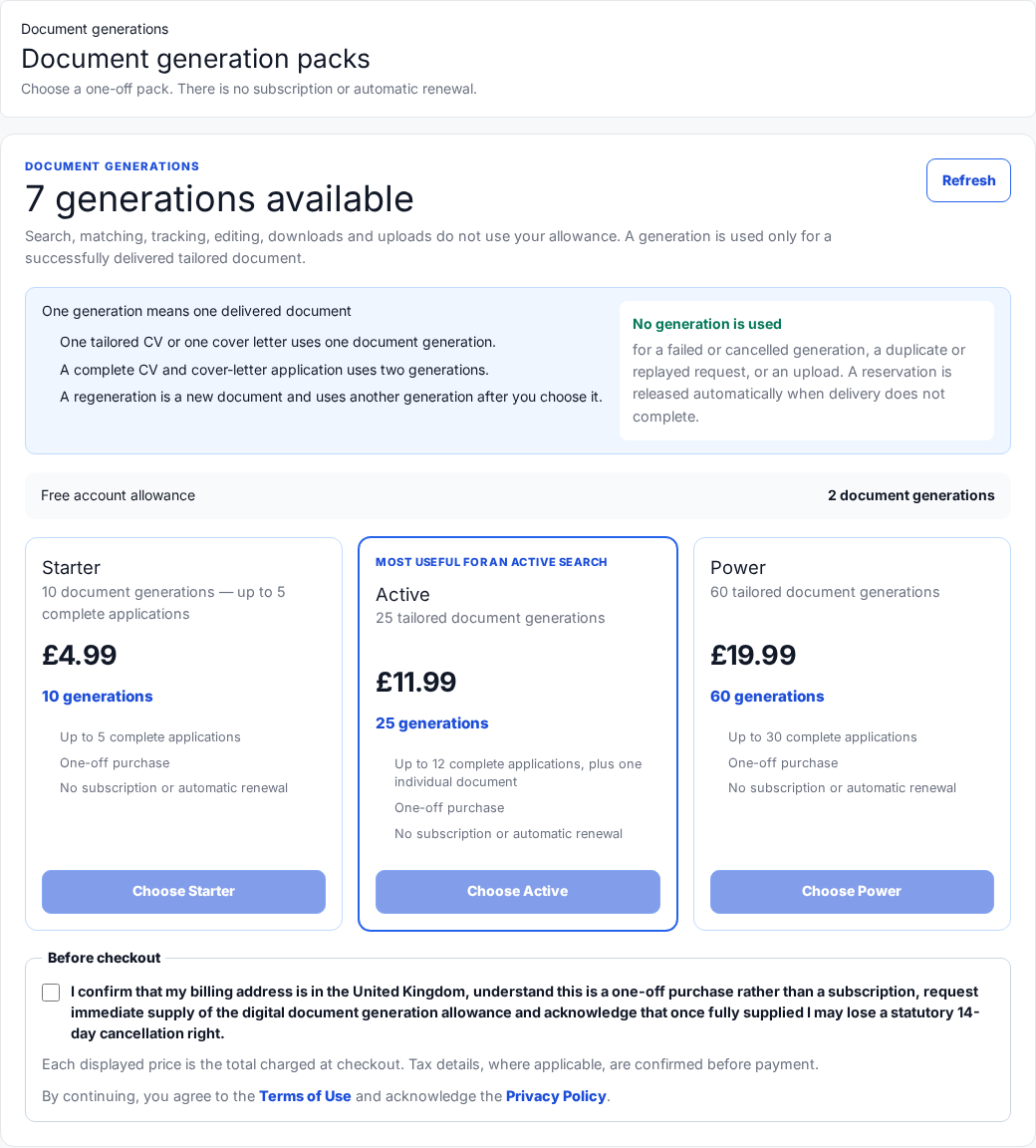
The pack buttons remain disabled until the Before checkout acknowledgement has been selected. This screenshot uses a fictional balance.
Follow these steps:
- Sign in and open Generation packs.
- Check your current balance and compare Starter, Active and Power.
- Read the Before checkout acknowledgement beneath the packs.
- Select the checkbox to confirm a UK billing address, one-off purchase and immediate supply request.
- Return to the chosen card and select Choose Starter, Choose Active or Choose Power.
- Complete payment on the secure Stripe-hosted checkout page.
- Return to Job Seeker Copilot and wait for the secure order-status confirmation.
The acknowledgement also explains that once the digital allowance is fully supplied you may lose a statutory 14-day cancellation right. Read the current Terms of Use before paying.
Keep payment details on Stripe
The card-entry page is hosted by Stripe. Check the address bar before entering payment details. Job Seeker Copilot support will never ask you to email a full card number, security code or password.
Your balance is credited only after the payment is confirmed securely by the server. A browser redirect alone is not proof that a payment succeeded.
If checkout does not open or confirmation is delayed
The checkout flow protects one purchase attempt from being duplicated.
- If the page offers Retry checkout safely, use that button. It checks the same attempt instead of creating another order.
- If Stripe says the checkout was cancelled or expired, return to the pack page and follow the message shown there.
- If payment is still being checked, wait briefly and use Refresh rather than buying the pack again.
- If your bank or Stripe receipt shows payment but the balance has not changed, do not make a second purchase. Check Generation history, then contact support.
When contacting support@jobseekercopilot.com, include your account email, pack, amount, approximate time and Stripe receipt or order reference. Do not include full card details.
Understand generation history
Open View generation history from the balance menu or visit Generation history.
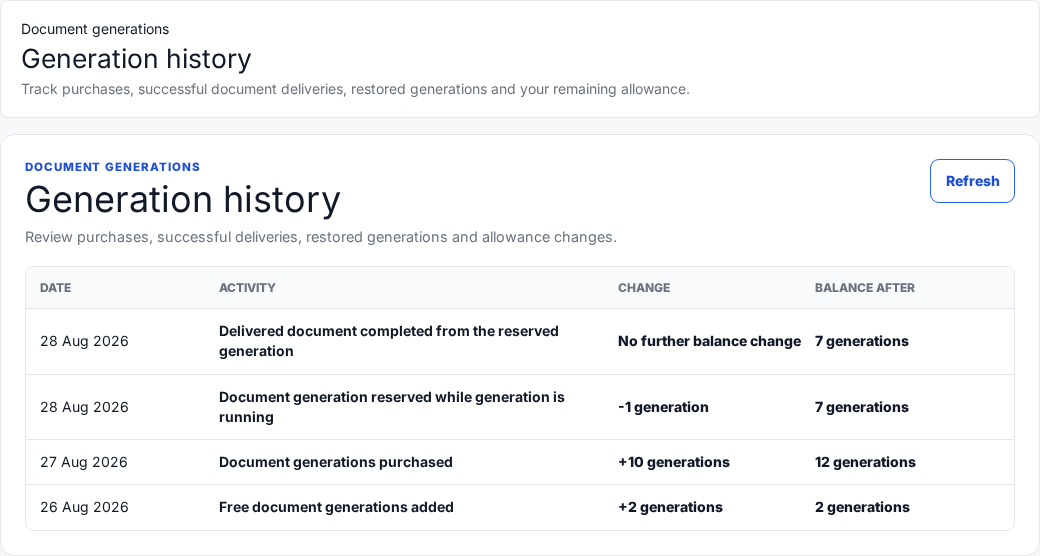
The history explains every allowance change and the balance after it. All entries shown here are fictional demonstration data.
Common entries include:
| Activity | Meaning |
|---|---|
| Free document generations added | The two free generations were granted to the account. |
| Document generations purchased | A confirmed one-off purchase added generations. |
| Document generation reserved while generation is running | One generation was temporarily set aside for a requested document. |
| Delivered document completed from the reserved generation | Delivery succeeded. There is no second deduction because the reservation already changed the balance. |
| Reserved generation restored | Delivery did not complete and the reserved generation was returned. |
| Refund, dispute or adjustment entry | The payment account or balance was changed after review. Contact support if you do not recognise it. |
Use Refresh if a just-completed purchase or generation is not yet visible.
Cancellations, refunds and disputes
The pack page requests immediate supply of the digital allowance. Cancellation and refund rights depend on the order state, generations already supplied or used, and the current consumer terms. Read the Terms of Use and contact support@jobseekercopilot.com with the order reference if you need help.
A refund or payment dispute can cause the related allowance to be reversed or placed under review. Do not open a second checkout to correct an existing order.
Quick answers
| Question | Answer |
|---|---|
| Do packs expire monthly? | No. They are one-off purchases, not monthly subscriptions. |
| Does uploading my own CV cost a generation? | No. Uploads are free. |
| Does a failed generation cost me? | No. Its reservation should be released automatically. |
| If I generate both documents, what is the maximum use? | Two generations: one for the delivered CV and one for the delivered cover letter. |
| Can I keep searching with no generations left? | Yes. Search, tracking, uploads and downloads remain available. |
| Should I buy again if checkout is uncertain? | No. Use Retry checkout safely, refresh the order status or contact support first. |